This blog was created during 2007-2008 when I lived in Saigon, Vietnam with my family. Some of the links are dead and some of the photos missing because I made the mistake of linking to photos hosted on AOL, a service which no longer exists.
Tuesday, February 6, 2018
Saigon Files


Tuesday, December 20, 2016
MySQL New Slave Settings
I can never remember which fields are important. It's the master_log_file and master_log_pos but these come from show slave status. Master_log_file is from master_log_file but master_log_pos comes from exec_master_pos.
CHANGE MASTER TO master_user = 'dbp3',
MASTER_PASSWORD='...',
master_log_file="mysql-bin.006818",
master_log_pos=234867554;
stop slave;
mysql> show slave status \G
*************************** 1. row ***************************
Slave_IO_State:
Master_Host: dbp1
Master_User: dbp5
Master_Port: 3306
Connect_Retry: 60
Master_Log_File: mysql-bin.006818
Read_Master_Log_Pos: 234867623
Relay_Log_File: mysqld-relay-bin.001129
Relay_Log_Pos: 234867713
Relay_Master_Log_File: mysql-bin.006818
Slave_IO_Running: No
Slave_SQL_Running: No
Replicate_Do_DB:
Replicate_Ignore_DB:
Replicate_Do_Table:
Replicate_Ignore_Table:
Replicate_Wild_Do_Table:
Replicate_Wild_Ignore_Table:
Last_Errno: 0
Last_Error:
Skip_Counter: 0
Exec_Master_Log_Pos: 234867554
Relay_Log_Space: 234867995
Until_Condition: None
Until_Log_File:
Until_Log_Pos: 0
Master_SSL_Allowed: No
Master_SSL_CA_File:
Master_SSL_CA_Path:
Master_SSL_Cert:
Master_SSL_Cipher:
Master_SSL_Key:
Seconds_Behind_Master: NULL
Master_SSL_Verify_Server_Cert: No
Last_IO_Errno: 0
Last_IO_Error:
Last_SQL_Errno: 0
Last_SQL_Error:
Replicate_Ignore_Server_Ids:
Master_Server_Id: 20
Master_UUID:
Master_Info_File: /var/lib/mysql/master.info
SQL_Delay: 0
SQL_Remaining_Delay: NULL
Slave_SQL_Running_State:
Master_Retry_Count: 86400
Master_Bind:
Last_IO_Error_Timestamp:
Last_SQL_Error_Timestamp:
Master_SSL_Crl:
Master_SSL_Crlpath:
Retrieved_Gtid_Set:
Executed_Gtid_Set:
Auto_Position: 0
1 row in set (0.00 sec)
Wednesday, March 23, 2016
Lending Club for Puerto Rico
Puerto Rico needs a peer to peer lending platform and it seems that there could be a great source of investment for such a platform.
Peer-to-peer lenders like Prosper and Lending Club run online platforms that can quickly and automatically match borrowers seeking a loan to an investor willing to provide the funds for that loan at an attractive interest rate.
In Puerto Rico the Act 22 community is a high net worth group with incentives to generate Puerto Rico sourced interest and dividends. If you hold an Act 22 tax decree, Puerto Rico sourced interest and dividends are tax free. However, there are not very many safe Puerto Rican investments these days. The Puerto Rican economy is struggling and it seems to me that increasing the availability of funds to individuals and entrepreneurs in Puerto Rico could help improve the economy here.
The two leading p2p lending companies, Prosper and The Lending Club, do not offer services in Puerto Rico. I did find that Peerform does lend in Puerto Rico, so at least the market is being served.
I did ask support at The Lending Club if there was a way to restrict my loans to Puerto Rico, and got this response:
To answer your question though, we don’t lend in PR. However, you should review the prospectus – you’re earning interest from Lending Club notes, not the underlying borrower, so location would not matter. The borrower is not paying you directly.
There are probably reasons for having the payments come from LC notes, not the underlying borrower. To tap into the Act 22 funds, this issue could be solved by having the interest payments come from an Puerto Rican company. It wouldn't need to come directly from borrowers.
I wonder if there is a way to test this idea by creating a Puerto Rican company that is in the business of making loans only in PR. What are the regulatory hurdles that need to be overcome? How big is the market?
I currently have funds invested with The Lending Club and I'm making over 8%. How great would it be if investors in Puerto Rico could get 8% tax free and local borrowers could have access to funds more easily and more cheaply than other alternatives?
Here's hoping someone will create The Lending Club for Puerto Rico. I would certainly be interested in investing.
Thursday, May 1, 2014
Growth Hacking Blogs
Note to self, follow these blogs:
Andrew Chen
http://andrewchen.co/recent/
Noah Kagan
http://okdork.com/blog/
Hiten Shaw
http://hitenism.com/
Friday, February 14, 2014
USB Tethering to Mac with Nexus 5
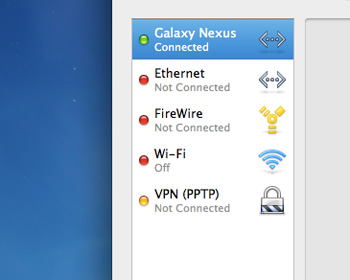 I've been traveling around Australia for over a month now. Mainly we've been staying at hotels where we have some sort of status, Hyatt, Hilton, Sheraton, etc., and the WiFi has been free.
This week I'm staying where they outsource the WiFi to Tomizone, which is fine, but they only let you use one device at a time, even though I've paid $60 for my 9 days. I'm using a Nexus 5 lately so I've been using the N5 on the WiFi and then tethering to my Mac over bluetooth. This works but seems a bit flakey. Occasionally the Mac can't connect and I have to turn the N5 bluetooth on and back off. Luckily Android also supports USB Tethering. Great, but of course the Mac doesn't support that out of the box. A quick search lead me to HoRNDIS by Joshua Wise. It works like a charm. Extra bonus, my N5 is always charging while I'm using the Mac.
Thanks to Mactip for the great Android Mac USB Tethering howto guide.
Next step, turn on internet sharing and get my Kindle and Nexus 7 on the net through the Mac via WiFi!
Friday, February 7, 2014
Thursday, February 6, 2014
Lake Wakatipu versus Lake Tahoe

Both lakes are amazing. We did have a windy day recently and I got to speak with a guy who just came in from kite surfing. He said it was pretty rare to be able to kite on Wakatipu. The same could be said for Tahoe!
Max Length
Wakatipu 75 km
Tahoe 35 km
Max Length
Wakatipu 75 km
Tahoe 35 km
Max Depth
Tahoe 501 meters
Wakatipu 280 meters
Altitude
Tahoe 1,897 meters
Wakatipu 310 meters
Area
Tahoe 191 square miles
Wakatipu 112 square miles


